机械臂配置使用教程
MCU Board
上层SOC和下层MCU通过CANBUS实现通信。此方法通过上层计算好 set_tilt通过CANBUS发送到下层,实现一定的底盘稳定控制。
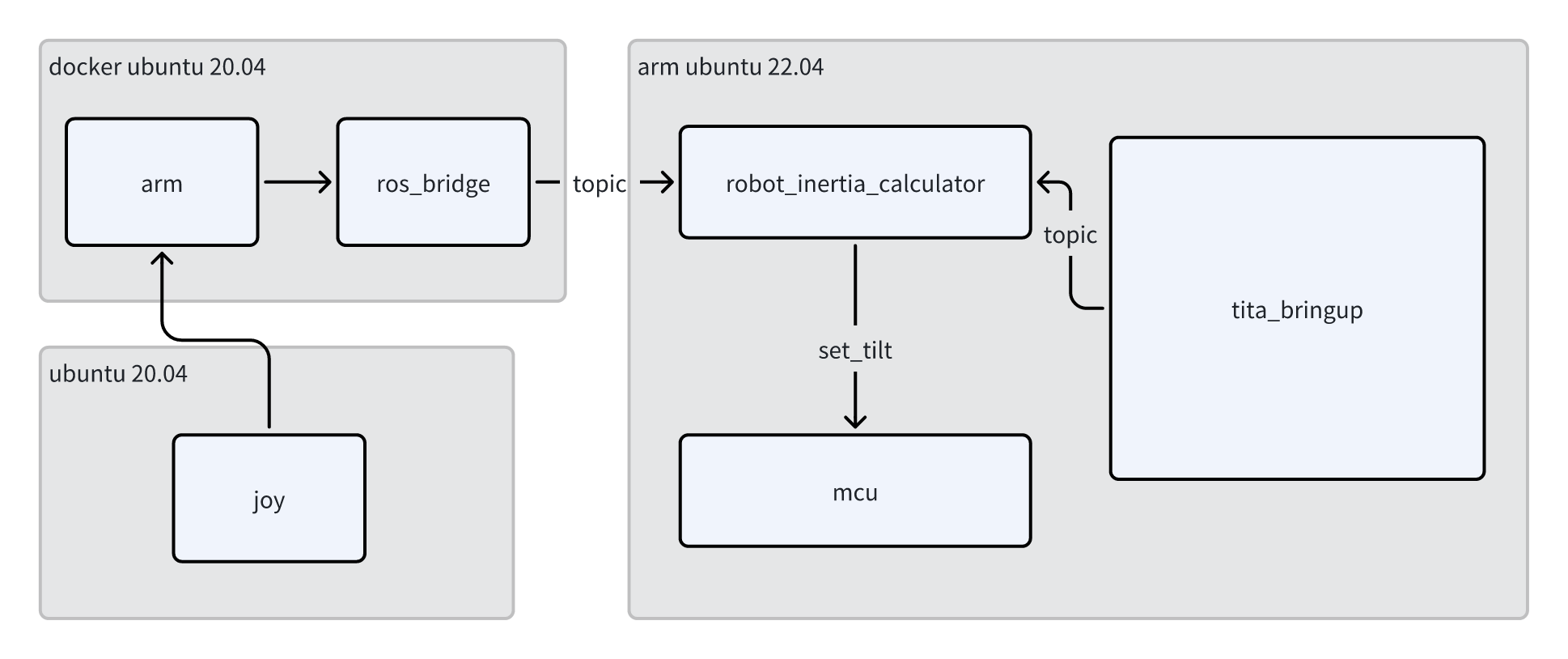
AIRBOT(求之)
配置
Airbot原生在ubuntu20.04下支持, 且提供支持ros1, 因此在NX上安装docker, 安装docker教程如下Docker在ARM安装, 如果后续系统默认带有docker, 则无需安装
Docker镜像
pull docker image
docker pull registry.cn-guangzhou.aliyuncs.com/ddt_robot/airbot_on_tita:v1.0
默认此镜像内带有ros-noetic,ros2-humble, 通过类似如下的命令来进入docker
docker run -it --rm --name airbot --privileged --cap-add=SYS_PTRACE -v $HOME/.ssh:/root/.ssh --network=host -v ~/manipulator:/workspace --workdir /workspace registry.cn-guangzhou.aliyuncs.com/ddt_robot/airbot_on_tita:v1.0 /bin/bash
备注
docker内的ros环境变量配置已经配好ros2-humble和ros1-bridge,无需再次配置
启动
修改docker内的ROS_DOMAIN_ID变量
sudo vim ~/.bashrc
export ROS_DOMAIN_ID=69 # 取决与你的tita的实际domain_id
配置好docker后,对修改后的docker进行保存
# in tita host
docker commit airbot modify_airbot
启动
硬件配置
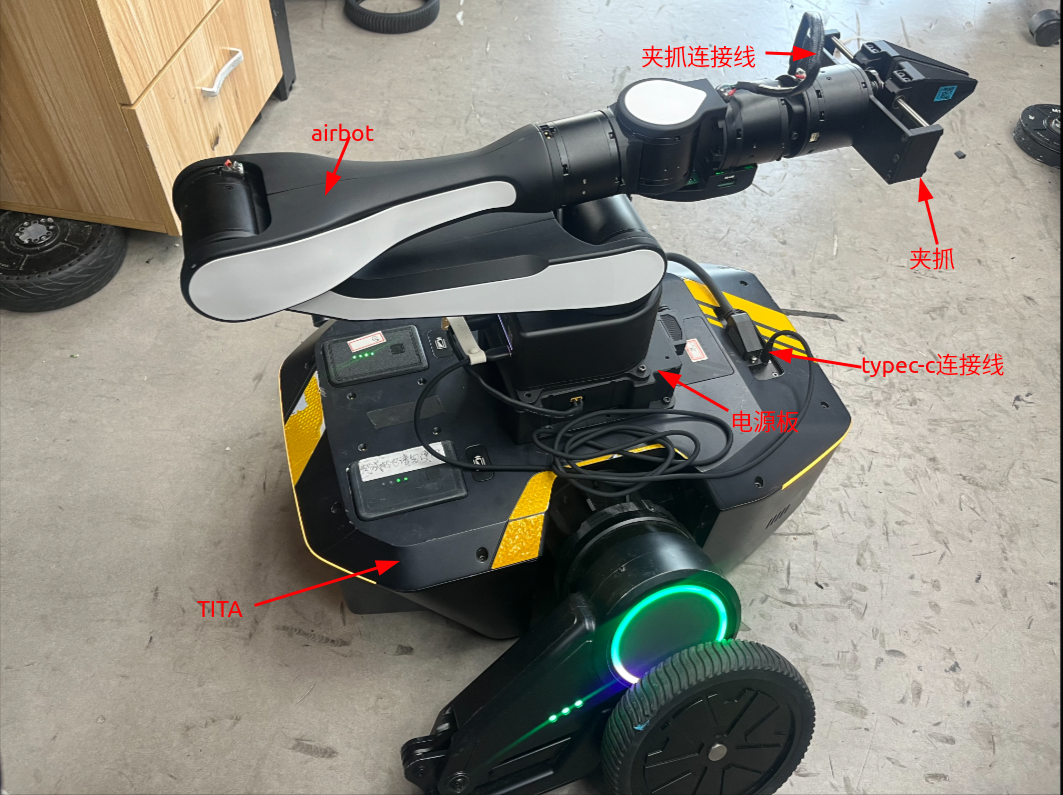
TITA机器人 x1 电源板 x1 TypeC 连接线 x1 Airbot x1 夹爪 x1 夹爪连接线 x1
将以上硬件连接起来,如图所示:
软件配置
通过ssh进入TITA机器人
ssh robot@192.168.42.1 # wire connected to host, if use wifi, check your tita ip address
新建一个工作目录,拉取机械臂相关代码,编译及启动(可遵循以下指令,一步步执行)
cd
mkdir manipulator && cd manipulator
git clone https://github.com/DDTRobot/airbot_on_tita
cd airbot_on_tita
bash docker_run.bash
# in docker container
source /opt/ros/noetic/setup.bash
catkin_make
bash can_up.bash # success if print "can1 up success"
bash ros_run.bash # launch ros_interface of airbot
# if in terminal print such as :
# terminate called after throwing an instance of 'std::runtime_error'
# what():  AIRBOT Play needs to be calibrated. Please run airbot_auto_set_zero or airbot_set_zero
# please kill with `Ctrl+C` and run with `airbot_set_zero -m can1` to set arm to zero position
# more information of airbot please refer to https://discover-robotics.github.io/docs/latest/AIRBOT-Play/tutorials/env/
备注
配置完以上步骤后,机械臂类似 ‘喀嗒’声响, 正常启动成功, 在正常编译好程序后, 可以在host内bash one_start.bash启动
使用机器人遥控器控制机械臂(可选)
备注
使用机器人操控机械臂时,遥控器无法控制机器人。
新建一个终端,ssh进入tita后
mkdir -p airbot_joy/src && cd airbot_joy/src
git clone https://github.com/DDTRobot/airbot_joy
cd ..
colcon build
source install/setup.bash
ros2 launch airbot_joy airbot_joy.launch.py
遥控器上更改操控模式
按一下遥控器上方小屏幕右侧按钮进入菜单
选择并单击第二项模式(user-sdk模式,选择成功会在前方显示 “ * ”)
左摇杆控制机械臂末端XY轴,右摇杆控制Z轴,右下按钮单击复位机械臂
注意底盘和臂的控制是解耦的,非sdk模式目前直接控制底盘,而sdk模式则只操作机械臂
关闭机械臂
机器连接电脑,并在电脑新建终端 2.使用ssh 进入机器人 3.先输入指令停止机械臂:
docker exec airbot pkill -SIGINT -f "roslaunch ros_interface airbot_arm.launch"4.关闭docker:docker stop airbot
备注
如果需要重新启动机械臂,可重新按照 one_start来执行即可。
常见问题:
can0 和can1 设备号分配问题导致canbus通信失败 解决办法: 1.机器人上电,等待机器人启动完成,然后在连接type-c 线